Every family has a unique story—a tapestry of relationships, histories, and connections that shape who we are. Documenting this narrative, however, can often feel daunting. Where do you begin? How do you structure generations of information clearly? At PDF Agile, we believe in simplifying complexity. That’s why we’ve designed a ready-to-use, intuitive Family Genogram Template to help you map your heritage with clarity and ease.
This professional template transforms the intricate task of creating a family diagram into a seamless, engaging process. Whether you’re a genealogist, a therapist, a student, or simply someone curious about your roots, our template within the PDF Agile app provides the perfect foundation to start your journey of discovery. Let’s explore how you can bring your family history to life.
What Can You Do With a Genogram Example in PDF Agile?
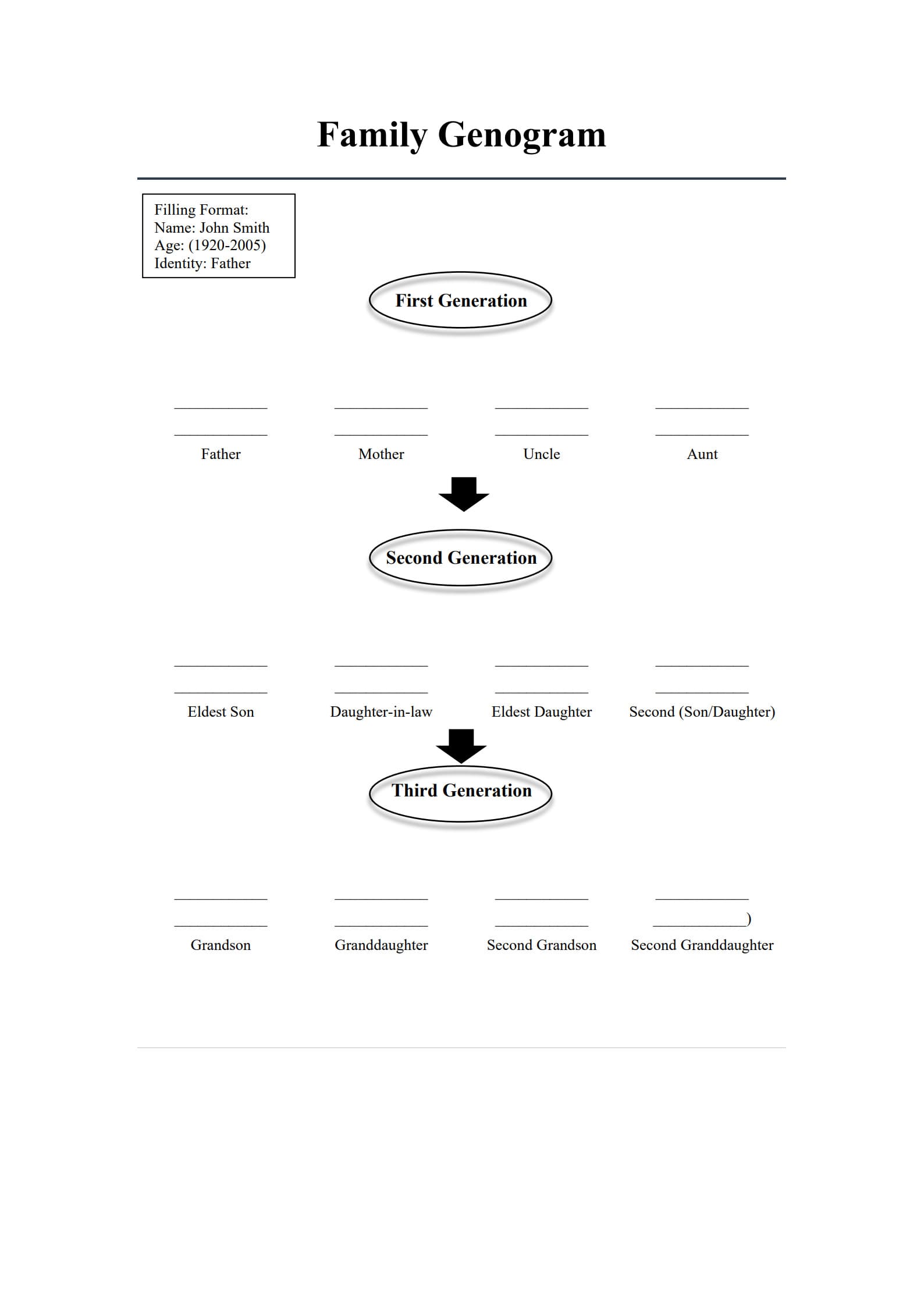
Have you ever looked at a family tree and wished it told you more than just names and dates? A genogram goes beyond a simple pedigree chart; it is a powerful visual tool that encapsulates relationships, emotional bonds, and key life events across generations. Our genogram example within PDF Agile is meticulously structured to help you capture this rich, multi-layered information. The template is pre-formatted into three clear generations, providing an instant framework that prevents you from starting with a blank page.
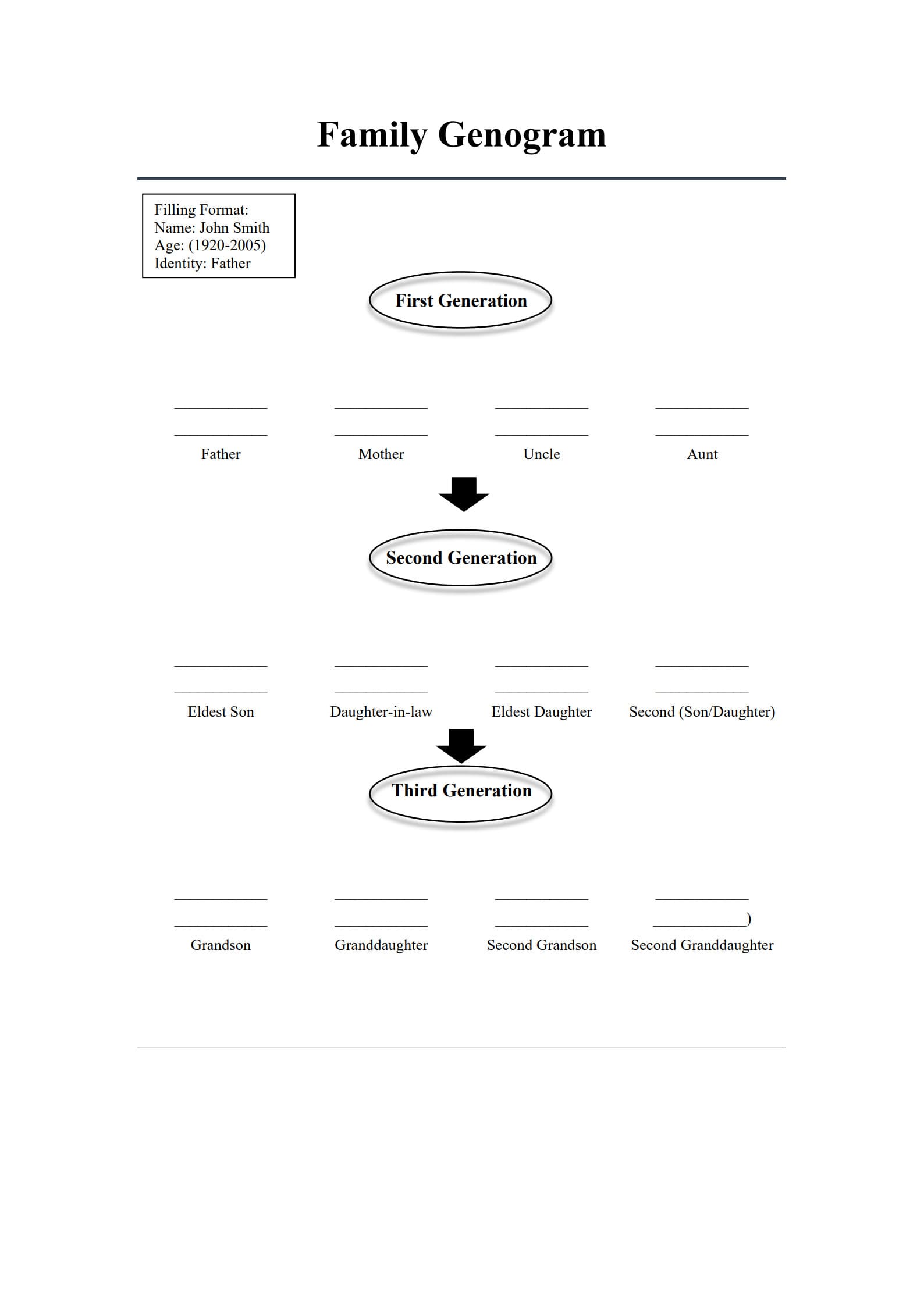
Consider the First Generation section in our template. It doesn’t just list “Father” and “Mother.” It provides a specific Filling Format: Name: John Smith, Age: (1920-2005), Identity: Father. This example is your guide. It shows you precisely how to condense a lifetime of information into a concise, standardized format. You can follow this model for the “Mother,” “Uncle,” and “Aunt” boxes, ensuring consistency throughout your document. This uniformity is crucial for readability and professional presentation. What does this mean for you? It means you can immediately begin inputting valuable data without worrying about layout or design. The connections—the arrows linking parents to children—are already in place. Your focus remains solely on the story, not the structure. This ready-made genomap template serves as both a guide and a canvas, enabling you to illustrate not just who your ancestors were, but how they were connected.
Where to Find and How to Use a Free Genogram Maker & Template?
The next logical question is: how do I access this tool and start my project? The beauty of PDF Agile lies in its integration of a powerful free online genogram maker with a professional template library. You don’t need separate software for design and editing. Everything is housed within one intuitive application. To begin, simply navigate to the “Template” section within the PDF Agile app or on our website. Browse the “Academic & Family” category, where you will find the “Family Genogram” template prominently displayed. With one click, you can open it directly in the app’s editing suite—this is your free online genogram maker in action.
Once opened, you’ll see the clean, effective diagram from our sample: the title “Family Genogram,” the instructive filling format, and the three organized generations. This is your active workspace. The template is not a static image; it is fully customizable using PDF Agile’s suite of editing tools. You can click on any text box—from “Eldest Son” in the Second Generation to “Granddaughter” in the Third—and replace the placeholder text with your specific family information. The lines and arrows are part of the template’s foundation, meaning the relational structure remains intact as you personalize it. This seamless process from discovery to customization underscores our commitment to providing a hassle-free, all-in-one solution. There are no hidden fees or complex exports; you have a professional genomap template ready to be filled with your unique family narrative.
Filling Out Your Template: A Step-by-Step Approach
With the template open, the process of populating it is straightforward and almost meditative. Start at the very top, using the provided format as your unwavering guide. For every individual, follow the “Name: John Smith, Age: (1920-2005), Identity: Father” model. This consistent approach ensures that every entry is informative and uniform. For instance, for the “Mother” box, you might enter: “Name: Mary Smith, Age: (1925-2010), Identity: Mother / Homemaker.” You have the flexibility within this format to add a brief, defining identity tag, which adds depth to your genogram.
Move systematically through the generations. After completing the First Generation (Father, Mother, Uncle, Aunt), proceed to the Second. Here, you will personalize “Eldest Son,” “Daughter-in-law,” “Eldest Daughter,” and the “Second (Son/Daughter).” Notice how the template uses inclusive language like “Second (Son/Daughter),” allowing you to define the relationship based on your family’s reality. Finally, document the Third Generation—Grandson, Granddaughter, Second Grandson, Second Granddaughter. As you fill each box, you are not just entering data; you are actively constructing a visual history. The pre-drawn arrows automatically give this data meaning, showing the flow from one generation to the next. This methodical filling turns abstract relationships into a concrete, easy-to-understand map.
Customizing and Expanding Your Family Genogram Sample
Our template provides the essential, universally recognized core structure. However, your family’s story is unique, and PDF Agile empowers you to honor that uniqueness. While the template smartly includes common roles like “Uncle” and “Aunt” in the first generation, what if your family structure differs? The built-in editing tools are your key to customization. You can easily double-click on any text label to rename it. For example, you could change “Uncle” to “Godparent” or add additional sibling boxes if needed.
Furthermore, the power of a genogram example lies in its potential for annotation. PDF Agile’s comment, sticky note, and drawing tools allow you to add layers of detail directly onto the diagram. You could use a colored highlight tool to circle multiple individuals who shared a profession, or use the text box tool to add a brief note next to a person’s name about a significant life event. The template gives you the clean, professional skeleton; our tools provide the colors and textures to flesh out the full picture. This flexibility ensures that the Family Genogram Sample is a starting point that grows with your research, adapting to become a comprehensive and personalized family document.
How to Use This Template on PDF Agile: A Quick Guide
Using our Genogram Template is a simple, four-step process within the PDF Agile app:
Step 1: Access the Template. Open the PDF Agile app and navigate to the Template Library. Search for “Family Genogram” and click “Use Template.” It will open instantly in your editing workspace.
Step 2: Personalize the Content. Click on any text field in the diagram. Using the provided format (e.g., “Name: John Smith, Age: (1920-2005), Identity: Father”) as your guide, replace all placeholder text with your family’s specific information. Work generation by generation for clarity.
Step 3: Customize and Annotate. Utilize PDF Agile’s tools to adjust the template to your needs. Change relationship titles, add shapes or icons from the toolbar, or insert text comments and notes for additional context using the comment feature.
Step 4: Finalize and Share. Once completed, save your genogram as a PDF file for perfect formatting preservation. You can then easily share it via email, print it for family reunions, or store it securely in your digital family archive.
Conclusion
A genogram is more than a chart; it is a legacy captured on paper—a gift to both the present and the future. With PDF Agile’s thoughtfully designed Family Genogram Sample, the technical barriers to creating this legacy vanish. You are equipped with a free online genogram maker and a professional genomap template that handles the structure, so you can dedicate your energy to the stories that matter.
Begin your journey of connection and discovery today. Open PDF Agile, load the Genogram Template, and start filling in the names that built your world. It’s time to map your history, understand your present, and preserve your story for generations to come.