This review is based on a comprehensive analysis of official EasyClaw documentation, detailed product reviews. We aim to provide an unbiased, real-world assessment of its functionality, ease of use, value proposition, and practical considerations to help you decide if it’s the right automation tool for you.
Overview of EasyClaw
EasyClaw is best for Non-technical users, office workers, students, and privacy-conscious individuals who want to experience powerful AI task automation without dealing with command lines, server setup, or Docker configurations.
Users seeking a “local-first” automation solution for repetitive desktop tasks like file management, data organization, content creation, and cross-app workflows, controlled conveniently via mobile messaging apps.
Not ideal for: Users requiring 24/7 unattended automation (as it needs the host computer to be on), those needing deep, low-level system customization, or teams needing advanced collaboration and management features.
Advantages of EasyClaw
True Zero-Configuration Deployment: One-click installer for Windows and macOS. No Python, Docker, or command-line knowledge required.
Uncompromised Local Privacy: All execution happens in a local sandbox on your computer. Your data, screen visuals, and commands never leave your device.
Access to Full OpenClaw Power: Provides a graphical user interface (GUI) to the robust, open-source OpenClaw framework, granting access to all its core “skills” and community plugins.
Flexible, Cost-Effective Model Choice: Allows you to connect your preferred LLM API (e.g., OpenAI, Anthropic, Google, or cheaper Chinese models like Kimi, Zhipu) for optimal cost-performance.
Innovative “Lobster Market”: Enables one-click deployment of pre-trained, professional AI agent configurations (like the famous “FuSheng Sanwan” team), drastically lowering the barrier to advanced automation.
What is EasyClaw, and Who is It For?
EasyClaw is a desktop application developed by Cheetah Mobile that acts as a “visual cockpit” for the open-source OpenClaw AI agent framework. Think of OpenClaw as a powerful but complex engine that requires a mechanic to install and tune. EasyClaw is the polished, user-friendly car built around that engine, with a simple key to start it and a clear dashboard to control it.
Its primary mission is to democratize AI task automation. It takes the formidable capabilities of OpenClaw—which can read your screen, control your mouse and keyboard, interact with web and desktop apps, and execute multi-step workflows based on natural language commands—and packages them into an application anyone can install and use in minutes.
Who is it for?
The Automation-Curious Beginner: If terms like “VPS,” “Docker,” and “environment variables” sound intimidating, but you’re fascinated by the idea of an AI assistant that can organize your downloads, summarize documents, or post to social media, EasyClaw is your perfect starting point.
The Privacy Advocate: For users handling sensitive work documents, proprietary data, or simply those wary of cloud-based AI services, EasyClaw’s “local-only” execution is a major differentiator. Your data never leaves your machine.
The Office Productivity Seeker: Professionals, researchers, and students drowning in repetitive digital tasks—formatting reports, compiling research, cleaning data sets, managing files—will find immense value in automating these workflows.
The Cost-Conscious User: The software itself is free. You only pay for the AI model usage (credits), and you can choose cheaper models to control costs, avoiding mandatory monthly SaaS subscriptions.
How EasyClaw Works: Setup, Logic, and Execution
Setup Overview: As Simple as It Gets
The setup process is where EasyClaw shines brightest, directly solving the biggest pain point of its parent project, OpenClaw.
Download & Install: Visit the official website, download the installer for your OS (Windows .exe or macOS .dmg), and run it. The process is identical to installing any standard desktop application.
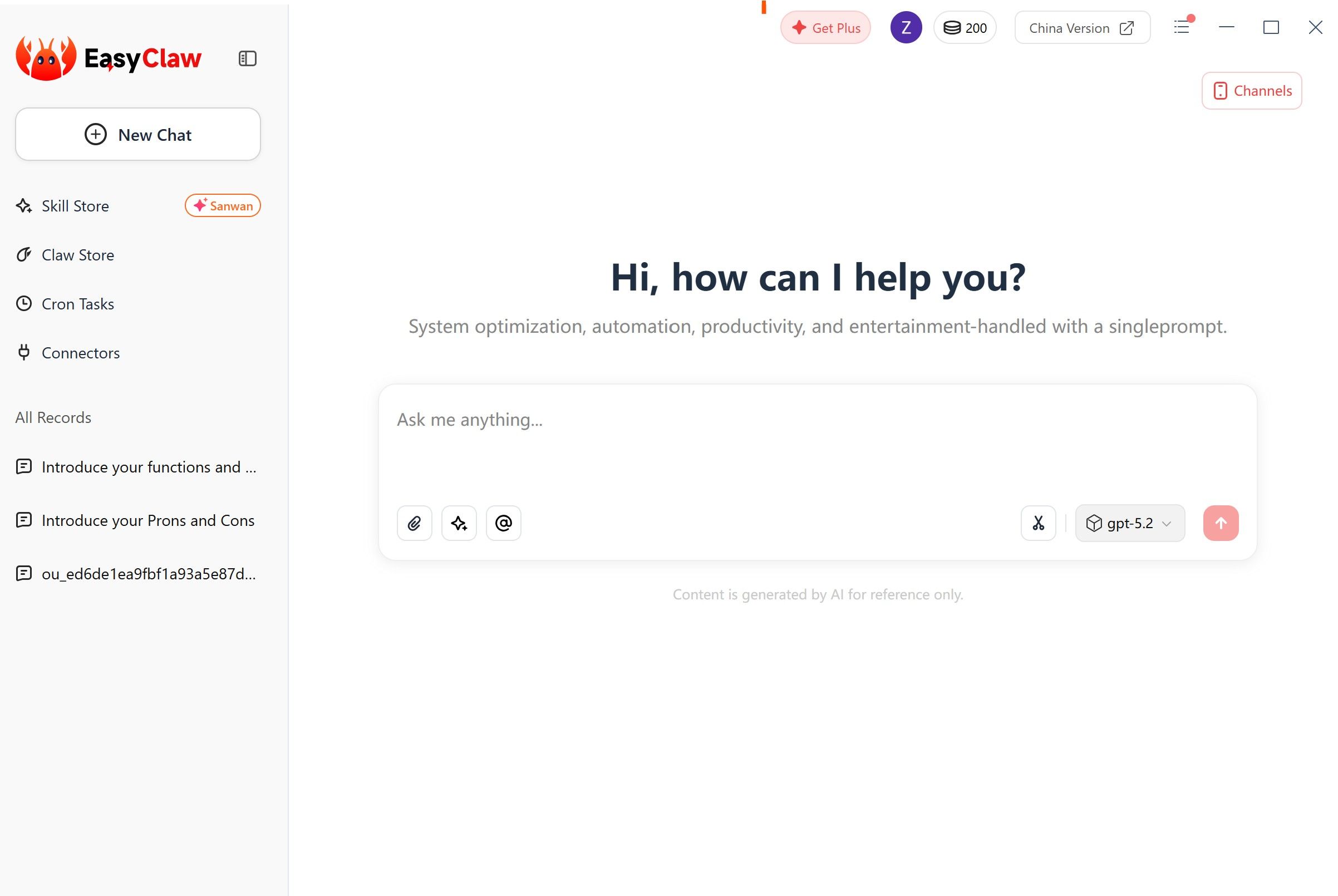
Initial Configuration: Upon first launch, a graphical setup wizard guides you. The key step here is connecting your LLM service. You input your API key for a provider like OpenAI, Anthropic, or Google. EasyClaw comes pre-configured with support for mainstream models.
Connect a Messaging Channel (Optional but Recommended): Link EasyClaw to a messaging app like Telegram, Discord, WhatsApp, or Feishu (Lark). This enables the powerful “remote control” feature, allowing you to send commands to your computer from your phone.
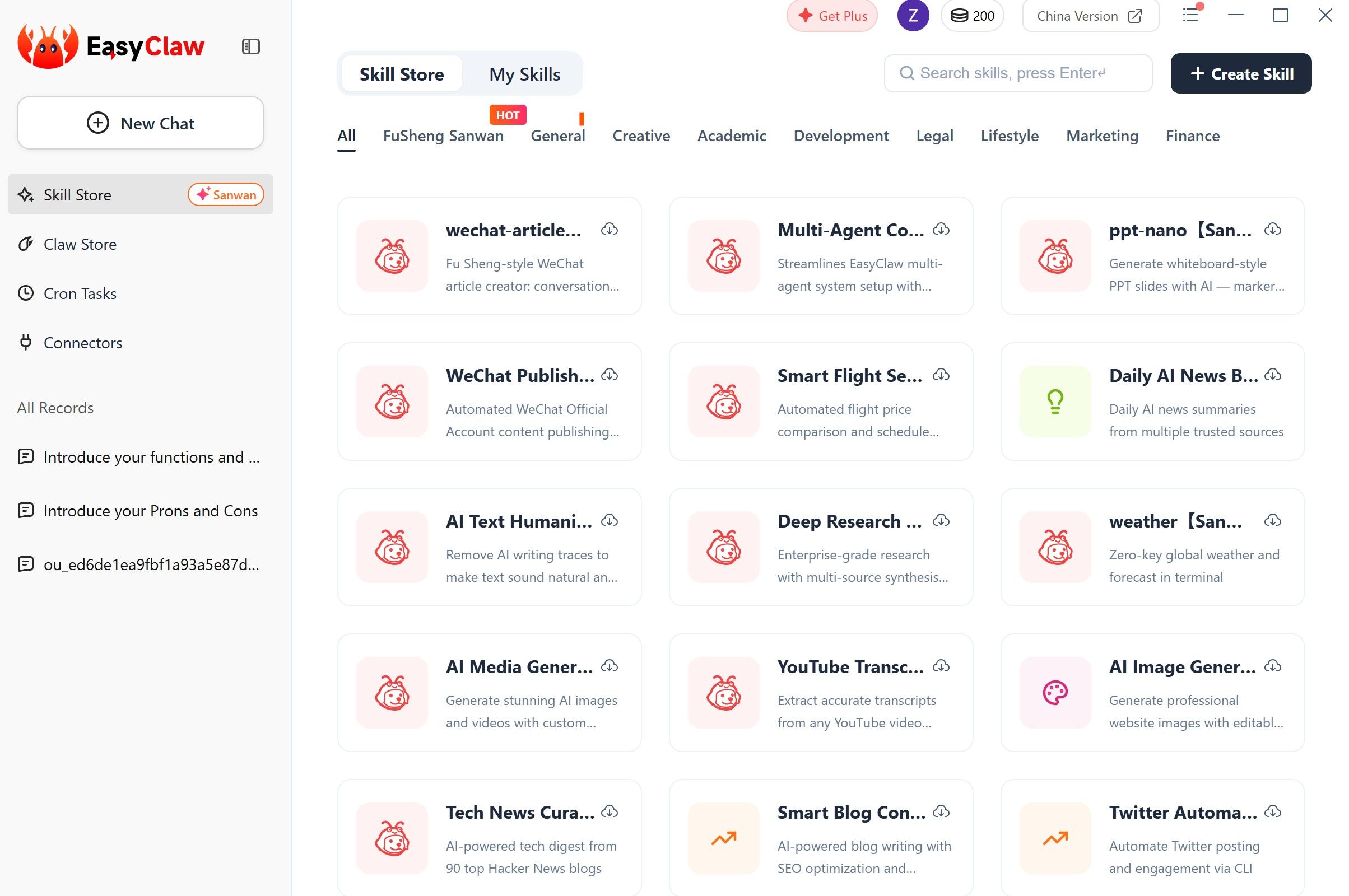
Explore the Skill Store: Browse the built-in “Lobster Market” or Skill Store, which categorizes hundreds of pre-made automation “skills” into areas like General, Creative, Academic, Development, etc. You can enable them with a click.
Execution Flow: Natural Language to Action
Command Input: You send a command. This can be done directly within the EasyClaw desktop app or, more conveniently, via a message in your connected app (e.g., a Telegram message saying, “Summarize the key points from the PDF in my Downloads folder and email it to me”).
AI Comprehension: EasyClaw forwards your natural language command to your configured LLM (e.g., GPT-4). The LLM interprets the request, breaks it down into steps, and determines which “skills” are needed.
Skill Execution: EasyClaw’s engine activates the necessary skills. These are small programs that can perform actions like reading text on screen, controlling the mouse, typing, opening applications, or calling specific web APIs.
Task Completion & Response: The skills execute the steps sequentially on your local machine. Once done, EasyClaw sends a confirmation message back to you via the app or updates the status in its desktop interface.
The entire process leverages the power of OpenClaw but hides all the underlying complexity of servers, gateway tokens, and Docker containers behind a clean interface.
Core Features That Define EasyClaw
1. The Visual Gateway to OpenClaw
This is its foundational feature. EasyClaw isn’t a stripped-down version; it’s a full conduit. It provides access to OpenClaw’s entire ecosystem of community-developed skills for tasks ranging from file manipulation and web browsing to sending emails and generating code, all through a point-and-click interface.
2. Privacy-First, Local-Only Architecture
Unlike cloud-based automation tools, EasyClaw executes entirely on your local hardware. The application interacts with your system’s UI and web apps natively, like a human would, but all visual data, intermediate steps, and results are contained within your machine’s sandbox. This addresses significant data security and privacy concerns associated with cloud agents.
3. Multi-Channel Remote Control
The ability to control your desktop computer from your phone via popular messaging apps is a game-changer for workflow flexibility. You can be anywhere and trigger a complex data processing task on your office PC, or ask your home computer to compile a report before you arrive.
4. The Lobster Market (Skill Store)
This is a standout innovation. The market is organized into nine core scenarios:
FuSheng Sanwan: Pre-configured setups mimicking the famous “30k” AI team, offering advanced, multi-agent collaboration out of the box.
General: Productivity tools for document processing, file management, and office automation.
Creative: Aids for writing, design, multimedia creation, and content generation.
Academic: Tools for literature research, data analysis, academic writing, and visualization.
Development: Assists with coding, debugging, testing, and documentation.
Legal: Helps with document review, compliance checks, and legal research.
Lifestyle: Automates smart home controls, messaging, travel booking, and daily information queries.
Marketing: Creates social media content, manages communities, and generates marketing assets.
Finance: Supports financial data analysis, modeling, and report generation.
This marketplace allows users to instantly “adopt” sophisticated automation workflows crafted by experts, bypassing the weeks of training and tuning typically required.
5. Tiered Access Model (Free + Credits)
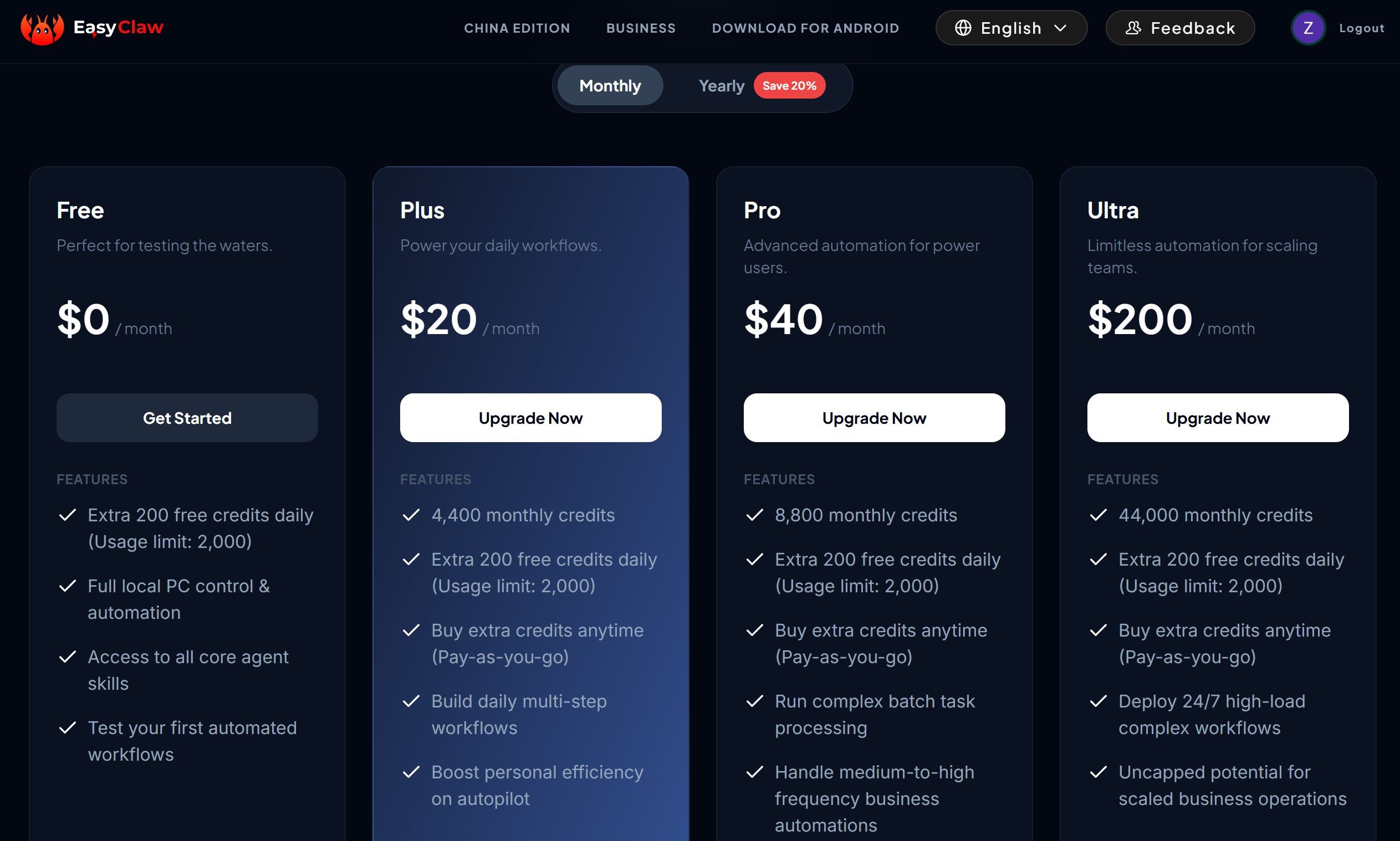
EasyClaw employs a flexible credit system:
Free Tier: Offers 200 free credits daily (with a 2,000-credit usage limit), full local PC control, access to all core skills, and the ability to test automated workflows. Perfect for exploration and light daily use.
Plus ($20/month): Provides 4,400 monthly credits plus the daily 200, aimed at powering daily multi-step workflows.
Pro ($40/month): Offers 8,800 monthly credits, designed for complex batch task processing and medium-to-high frequency business automation.
Ultra ($200/month): Provides 44,000 monthly credits for teams needing to deploy 24/7, high-load complex workflows.
Credits are consumed based on task complexity and the LLM model used. Notably, using cost-effective models like some Chinese LLMs can reduce credit consumption significantly (e.g., to 0.6x or even 0.25x of the base rate).

Analysis of EasyClaw’s Value Proposition
Ease of Use & Deployment: A+
This is EasyClaw’s killer feature. The promise of “3-minute setup” vs. OpenClaw’s potential “3-day setup” is real. The graphical installer and setup wizard remove the single biggest barrier to entry for OpenClaw’s powerful technology.
Privacy & Security: A+ for Local Focus
For users concerned about sending sensitive screen data or business documents to third-party servers, EasyClaw’s model is ideal. The risk of data leakage is minimized. However, the security of individual “skills” downloaded from the community marketplace should still be vetted by users, a consideration inherited from the open-source ecosystem.
Cost Structure: B+
The “software free, pay for usage” model is attractive and flexible, especially compared to flat-rate subscriptions like Kimi Claw (199 RMB/month). The free daily credits are generous for experimentation. However, the flip side is that costs are variable and tied to your API expenses. Heavy users automating complex tasks could see credits deplete quickly, making the monthly plans necessary for predictable budgeting.
Power & Flexibility: B+
It brings the vast majority of OpenClaw’s power to the masses. The skill store is incredibly rich. The main limitations are the lack of 24/7 unattended operation (requires your PC to be on) and potential constraints for developers who want to modify the deepest layers of the system, which a native OpenClaw deployment on a VPS would allow.
EasyClaw vs. The Competition: OpenClaw and Others
| Feature | EasyClaw | OpenClaw | Kimi Claw / MaxClaw (Cloud Alternatives) |
| Ease of Setup | Excellent. One-click install, graphical UI. | Poor. Requires technical knowledge, VPS/Docker setup. | Good. Cloud-based, usually simple sign-up. |
| Control & Power | High. Full desktop control via OpenClaw skills. | Highest. Full system access, deep customization. | Moderate to High. Often cloud-controlled, may have limits. |
| Privacy Model | Local-Only. Data never leaves your PC. | Self-Hosted. You control the server and data. | Cloud-Based. Data processed on provider servers. |
| Cost | Free software + LLM API costs (pay-as-you-go). | Free software + hosting/VPS costs + LLM API costs. | Monthly subscription fee (often includes LLM calls). |
| 24/7 Operation | ❌ No. Requires host computer to be running. | ✅ Yes. Can run on a always-on VPS. | ✅ Yes. Cloud-hosted. |
| Best for | Non-technical users, privacy-focused individuals, desktop automation. | Developers, IT pros, tech hobbyists who need full control. | Users who prefer hands-off, managed cloud services and need uptime. |
The Verdict: EasyClaw sits in a sweet spot. It offers much more power and privacy than typical cloud automation tools while being infinitely more accessible than the raw, technical OpenClaw. The trade-off is the lack of persistent 24/7 operation.
Who Should Use EasyClaw (Final Recommendations)
Use EasyClaw if you:
Have been curious about AI agents like OpenClaw but were stopped by the technical complexity.
Value data privacy and want automation that runs entirely on your own machine.
Primarily need automation for tasks on your personal or work computer during your active hours.
Want to start with a free tier and have flexible, usage-based costs.
Are excited by the idea of instantly using pre-built, professional agent setups from the Lobster Market.
Avoid EasyClaw (or consider native OpenClaw on a VPS) if you:
Require workflows to run 24/7, even when your main computer is off.
Are a developer or power user who needs to deeply customize the agent’s underlying code or host it on a specific server configuration.
Need enterprise-grade collaboration features, user management, and audit logs for a team.
Are completely unwilling to manage any external API keys or deal with variable usage costs.
Conclusion
EasyClaw is a revolutionary product that successfully bridges the gap between the formidable power of open-source AI automation and the average user’s technical skill set. It takes the genius of OpenClaw and packages it into a form that is not only usable but delightful and intuitive.
Its core strengths—effortless deployment, uncompromising local privacy, and access to a rich ecosystem of pre-built skills—make it an outstanding choice for students, professionals, creators, and anyone looking to supercharge their personal productivity on their existing computer. The innovative Lobster Market feature is a masterstroke, dramatically lowering the barrier to achieving sophisticated, multi-agent automation.
The limitations are clear and fair trade-offs for its target audience: the need to keep your computer on, the responsibility for your own LLM API costs, and some constraints for ultra-power users. It is not a direct replacement for a self-hosted, 24/7 OpenClaw server for hardcore techies, nor is it a fully managed cloud service.
In summary, EasyClaw delivers on its promise as the “one-click Lobster” (one-click Lobster tool). It is arguably the fastest and safest on-ramp to practical, powerful AI desktop automation available today. For the vast majority of users who have been watching the AI agent revolution from the sidelines, EasyClaw is the key to finally getting in the driver’s seat.